Using a Solid Form as a Void to cut Curtain Panels and Mullions
From Philip Chan’s blog:
The concept is simple, I make a Generic family (it can be any category actually) as a solid (in this case, just a simple extrusion), let the family intercept the curtain wall, then use “Cut Geometry” to cut out the curtain panel.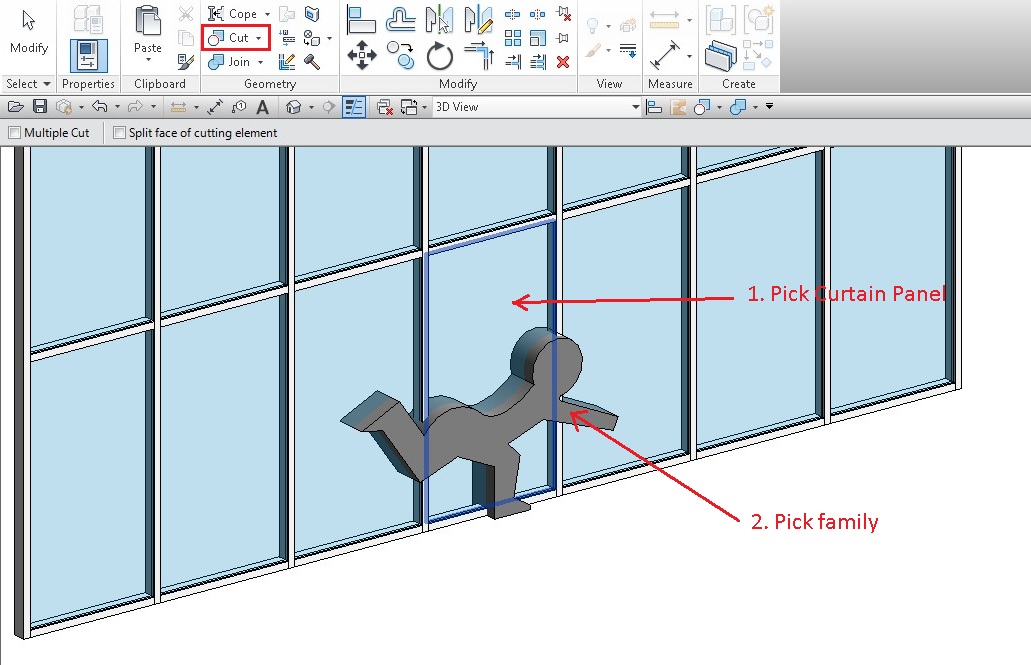
Once I made all the cut in the curtain wall, I have a yes/no parameter to control the visibility of the solid so that I can “turn off” the solid. As a result, it would appear that the curtain wall is cut out by a void. The good news is you can use the same family to make multiple cuts and it will work on the mullions as well.
Read more:
http://phil-osophyinbim.blogspot.co.uk/2013/08/curtain-wall-and-engraving.html
Discussion
4 archived comments. New comments are not enabled.