Save All Families in a Project to RFAs and Folders AUTOMATICALLY
This is awesome. Let’s say you have a project with heaps of families in it, and you want to save them to individual files. There is an API add on that does exactly this. How do you get it and use it?
First of all, download this file (Chapter 24) from the Sybex resource page for the book Mastering Revit Architecture 2011.
Now:
- This is a ZIP file, so unzip the file.
- Browse in the contents to:
c24ExampleApplicationExampleApplicationbinDebug - Copy everything from this folder to:
C:Revit Projects - Copy the two .addin files from the c24 folder to the correct location as shown below:
* For a specific user:
o For Windows XP – C:Documents and SettingsApplication DataAutodeskRevitAddins2011
o For Vista/Windows 7 – C:UsersAppDataRoamingAutodeskRevitAddins2011
* For all users:
o For Windows XP – C:Documents and SettingsAll UsersApplication DataAutodeskRevitAddins2011
o For Vista/Windows 7 – C:ProgramDataAutodeskRevitAddins2011
Refer to this post at The Building Coder for more information. - Restart Revit 2011
Now, on the Add-Ins ribbon, there will be a new section for the Revit Family Export Utility:
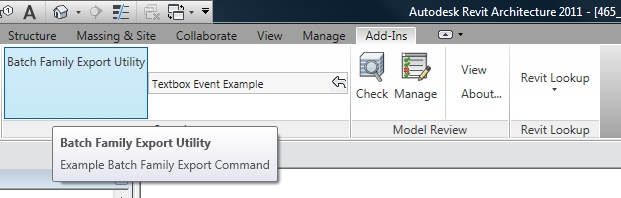
When you run this with a Project open, it will prompt you for a directory, and then it will save all the families from the current Project to .rfa family files, and it will put them into appropriate directories (by Category) for you!
This is a very cool tool – thanks to Don Rudder for his great chapter in the book, and for this excellent API demonstration.
Consider some ways you could use this:
- Load a bunch of families into a project and get this tool to sort them into appropriate folders for you.
- You have an RVT but you do not have the RFA files for families loaded into the RVT – use this tool to get them all out quickly.
- Transfer all RFAs from one RVT to another by saving them out and then loading them all in at once.
Discussion
26 archived comments. New comments are not enabled.
The add in worked well exported all the families to the file location i wanted but it didn't put them into appropriate directories (by Category). They are just placed at random in the file. Is it my mistake?
Have you tried just using the default 'Exported Families' directory?
It might help?
Glad to see you got this one working for you. What ever were the issues back when we were talking through LinkedIn?
Regards,
Don Rudder
It was just one of those things that seemed to resolve itself...when I stopped messing around trying to build the thing and just used the debug versions, it worked fine!
Thanks for your help, and for this awesome tool.
Luke
The other question is why copy the files to "C:Revit Projects" and not to the add ins folder?
C:Revit ProjectsExampleApplication.dll
Very helpful add-in for BIM managers. One quick question if I may, and excuse my "noobie-ness", but why do I receive the message:
"Value cannot be null. Parameter name: path", after selecting the destination folder and after pressing the export all families button? All seems to work fine after selecting "ok" to this message.
Thanks and keep up the good work!
I follow the instruction above but it appears "command load error".
How can this be fix?
C:Revit ProjectsExampleApplication.dll
Yep, I already do that but still isn't working maybe the .dll itself has a malfunction coz i try to open some files in Microsoft VS there's a lot of errors.
I don't have enough knowledge in Visual Studio so I can't do to fix those errors.
I really need to have these addins..Im using Win 7 64 bit..RevitMEP2011..
Please Help me..
C:ProgramDataAutodeskREVITAddins2011
Check the path in the .addin files and refer them also to the above folder...
I did everything you asked to do but I keep getting this prompted on my screen "Command load failed" Any idea what this might be?
I've trioed installing it in RAC 2012 and I get the following:
"
Failed to initialize the add-in "ExampleApplication.addin" because the add-in registration is missing the required value of VendorId node. The VendorId node identify the vendor of the add-in application. For Revit to run the add-in, you must register the node defined in manifest "ExampleApplication.addin" file.
"
(same error for the ExampleCommaond.addin file)
I think I solved this by adding the line Sybex but now I get a more serious error:
"
Revit cannot run the external application "ExampleApplication". Contact the provider for assistance. Information they provide to Revit about their identity:.
System.IO.FileLoadException
Could not load file or assembly 'file:///C:Revit ProjectsExampleApplication.dll' or one of its dependencies.
Operation is not supported. EException from HRESULT: 0x80131515
"
I would love to be able to use this tool in 2012 so any help would be appreciated.
Add the following into both .addin files just above the line
Example.
RAW
(you do not need this line, just as reference)
where I can find this folder C:Revit Projects
where i can find it