Repurposing the Autodesk USB Media
You have received one of the Autodesk Suites, installed it, and you want to use the USB key for some other purpose.

It is not immediately obvious that this is possible. There is some very decent write protection in play here – you can’t delete the partitions in Windows or Linux, you can’t format in Safe Mode, you can’t even use low level format tools or the HP USB Format tool.
You have to go deeper. Continue at your own risk… (below the bars)
NOTE: When reading the Comments, you may have to press “load more” at the very end of the page to see the most recent ones.
EDIT 12
Recent anonymous comment refers to a pin mod that may save bricked drives, screenshot included here:
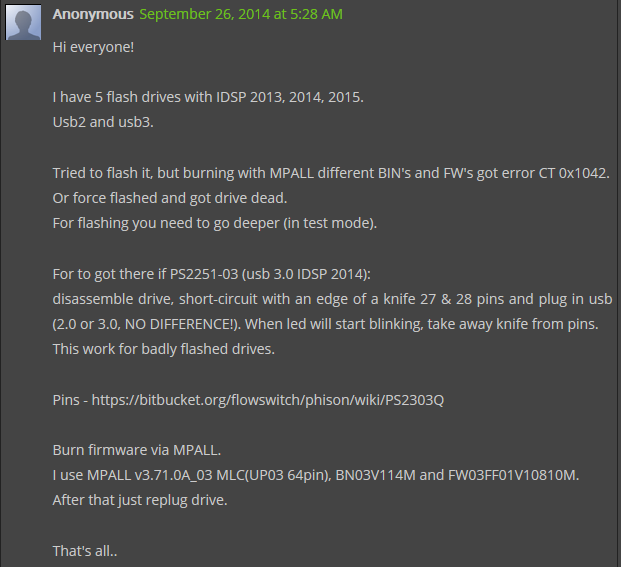
From the comments:
- MPALL_F1_7F00_DL17_v363_0C / Phison MPALL v3.63.0C-DL17
- Start it, put your usb stick into your USB 3.0 port.
- Click update, then settings.
- Choose advance settings and load the ini file, the same that Mike created.
- Click save, and ok on a pop-up window.
- Close settings window by clicking on “x”.
- Click start, the process lasts for about a minute and it’s doneWARNINGSThere is some evidence of newer drives being bricked.
Some things you shouldn’t do:
- Do not use the formatter.zip on the latest 2014 version TOSHIBA USB 3.0 with the 2251-03
- Do not try to force a certain BIN file onto the drives firmware using MPALL
EDIT 10 – 2014 drives
Solved by Mike in the comments. He also provides a link to download the proper version, at:
https://docs.google.com/file/d/0BwZ-eoAYLKKAMnpnQi1hbnpVSUk/edit?usp=sharing
Mike’s steps:
I used Phison MPALL v3.63.00.. not the 3.63.0C or the 3.63.0c-DL17
Plug into a usb3.0 port.. this is critical. YOU MUST USE USB3
Copy the contents between the ===== to a new file named 2014_2251-03.ini
===========================================
[PenDriveMP]
IC Type=PS2251-03
[Parameter Mark]
Parameter Type=F1_MP_21
[Customize Info]
USB VID=0x0930
USB PID=0x1400
String Product Name=USB DISK 3.0
String Manufacturer Name=TOSHIBA
Inquiry Version=PMAP
Use30Fixture=1
IDBlkLibrary_Version=1.2.16.0
[Configuration]
Reset Serial Number=0
[TestItemOption]
Do Preformat Test=1
[Extra]
Mode=3
[Misc]
Volume Label=USB DISK
Burner Erase All=1
Wafer Erase All=1
set1667=0x00
[Advance]
FC1=0xFF
FC2=0x01
CheckLegacy=1
[Firmware]
ISP=0
===========================================
Open MPALL_F1_0702_V363_00.exe
Click Update
Click Setting, select “Advanced Setting” then press OK
Click the load button and select the 2014_2251-03.ini file you created earlier.
Click Save, press OK
close the settings window
Click Start…
EDIT 9 – 3 step process for 2013
This may seem a bit long winded, but I think it might be a good way for 2013 media kit:
- Run MPALL 363 c (as per settings below) (make sure its revision C)
- Run Silicon Power Formatter
- Format using Windows
You can try this process in MPALL (step 1 above):
Recieved Brand New USB’s For Autodesk Design Suite 2013 Premium
IC version 2251-67
This is how i reformatted them
Download MPALL_F1_9000_v363_00 and MPALL_F1_9000_v363_0C
Run Getinfo
open MPALL_F1_9000_v363_00
Click Update
In Advanced settings
set Controller to PS2251-67 and FC1-FC2 to 01
In Firmware tick ‘Do ISP’ ‘Erase Code Block’ and ‘Auto ISP’
In Partition Seeting Tab
Set Number of Partition to 1
Save and Press Start
This will Fail
Close MPALL_F1_9000_v363_00
run getinfo in MPALL_F1_9000_v363_0C folder
and open MPALL_F1_9000_v363_0C
Update again
go into advanced settings
set Controller to PS2251-62 and FC1-FC2 to 01
Untick all boxes in firmware
In Flash Settings Tab Check
Auto Detect
Preformat
Erase Flash
In Partition Setting Tab
set ‘No of Partitions to 1’
save and press start
IC Type=PS2251-67
[Parameter Mark]
Parameter Type=F1_MP_21
[Customize Info]
USB VID=0x13FE
USB PID=0x4100
String Product Name=USB DISK 2.0
Inquiry Version=PMAP
[Configuration]
Reset Serial Number=0
AutoFirmware=1
[TestItemOption]
Do Preformat Test=1
[Extra]
Mode=3
[Misc]
Volume Label=USB DISK
Burner Erase All=1
Wafer Erase All=1
set1667=0x00
[Advance]
FC1=0xFF
FC2=0x01
[Firmware]
ISP=1
EDIT 7 – For PS2251-67 (From Ryan Ruta in the Comments)
I found a solution for the latest drive that I received with the PS2251-67 Controller.
1. Download the file from this link… http://www.silicon-power.com/UFD_Recover_Tool/UFD_Recover_Tool.rar and extract it to your drive.
2. Plug in your USB drive.
3. Run the format tool from the download.
4. Unplug your USB drive and plug it back in.
5. Format the drive using the Windows format tool (or other tool of your choice) as NTFS.
EDIT – 5 From the comments, for DaneElec zMate USB 32 GB:
Inside my USB Drive (also named DaneElec zMate USB 32 GB) I found a controller SM3254Q AE, produced by SMI. I used smi_mptool_v2.03.34_v7_j1118_3254ae and now it works.
The software I downloaded from site: http://tagievara.narod.ru/pages/programs/flash/smi.html
Direct URL: http://depositfiles.com/files/acu0018d9
1. Run sm32Xtest.exe.
2. Press “Scan USB” button.
3. Press “Start” button.
After few minutes the device is ready to use.
EDIT 6 – for Autodesk Product Design Suite Ultimate 2013
The installation USB flash memory (key, dongle) used for distribution of Autodesk Design Suites is a read-only device and cannot be overwritten or formatted with standard methods.
If you want to “misuse” this USB memory to store your data you can “hack” it with internal reformatting, make it a standard R/W device.
E.g. Autodesk Product Design Suite Ultimate 2013 uses the USB key of the type “DaneElec zMate Aero” (blue) – see Dane-Elec – with the controller SM3254Q AE.
To overwrite this USB key you can use the utility SMI ReFixInfo. This tool can be downloaded here (file MI_ReFixInfo_1_0_0_1.7z).
Start the downloaded EXE and click “Reset Write Protect”, W.P select Un-Write Protect. Then click Start.
Be warned! Make sure you have a backup copy of your original installation files. This procedure may lead to a damage of your USB key and is completely unsupported.
(by P.Hrazdil)
via CAD Forum – How to re-format the Autodesk instalation USB key?
I dismantled a spare USB key that we had received for Building Design Suite Premium. This wasn’t such an easy thing to do…but hopefully you won’t have to, now that I have done it for you!
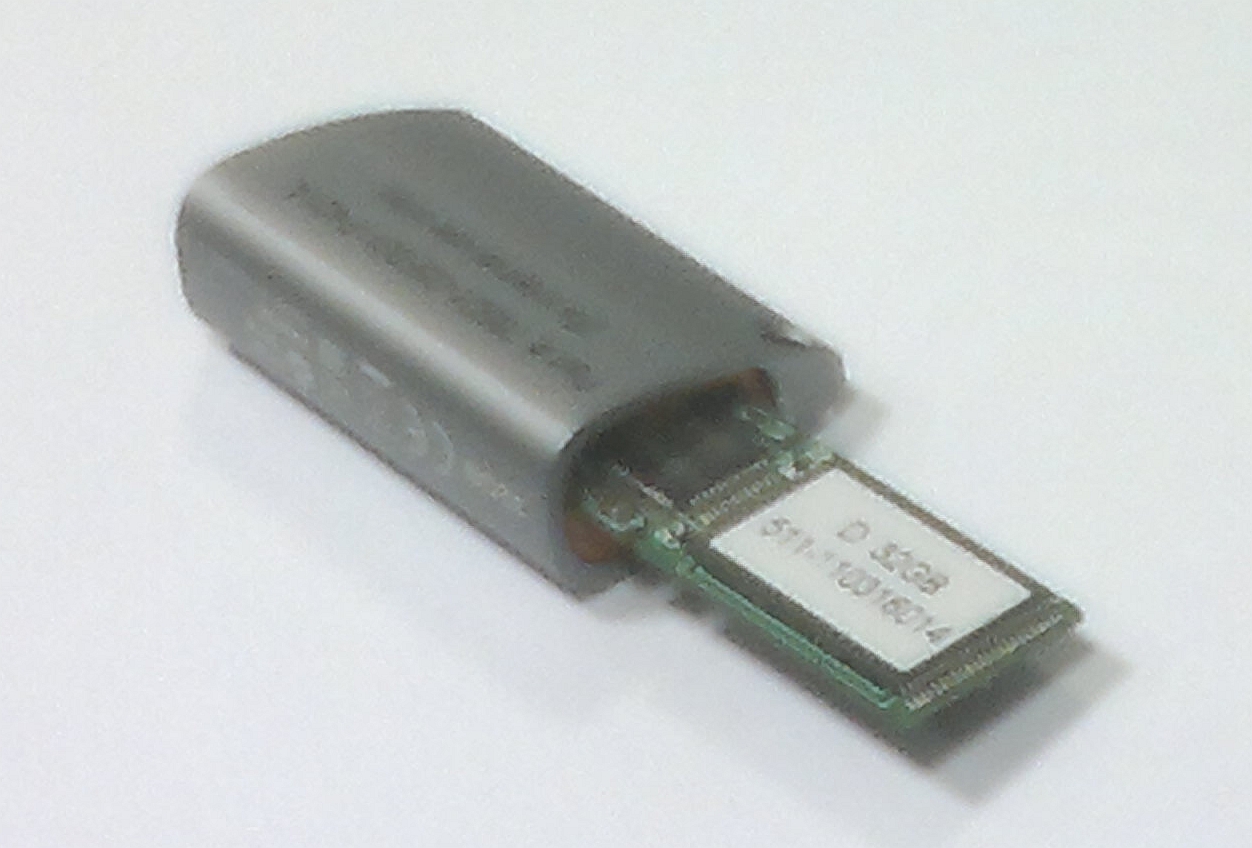
I already knew that it was ostensibly a Toshiba flash drive, code PA3708, 32 gb (have a look on the case of yours, see if it is the same).
However, what I really needed to know was the IC, or controller chip brand / make / model. Dismantling the key told me it was a:
PHISON 2251-60-5
Ok, from here I found this page, which led me to download the Phison MPALL utility bundle. You will need to download it too:
Phison_MPALL_v3.20.0B
Read on below the bars…
Also, if you’re looking for a flash drive or an external drive, try looking here with coupons
EDIT-1 You may be able to find updated versions of MPALL via Google Search. I am unsure what the copyright / usage license situation is with this program (deleted some links).
EDIT-4 You may want to try Formatter first – Craig at iRevit has hosted the Formatter.zip and tested it (May 2012)
From here, it was a bit of trial and error. This is how you do it:
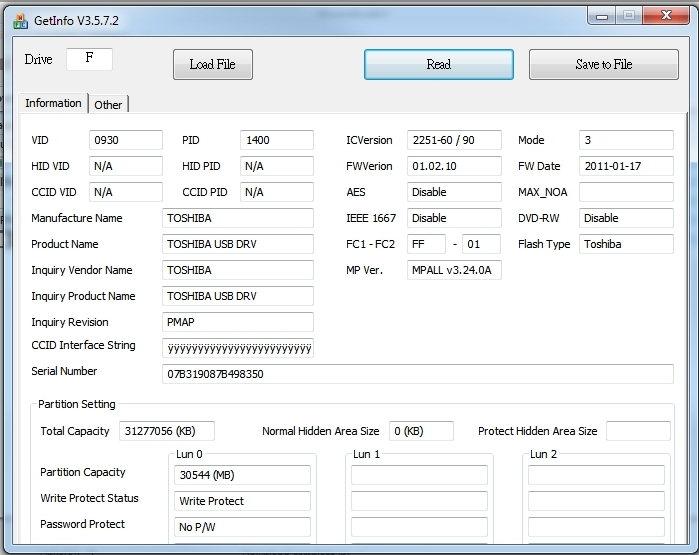
- First of all, open GetInfo.exe
Put in your drive letter and click ‘Read’. You should be able to get an output that looks something like this:
- Next, open MPALL_F1_9000_v320_0B.exe
- Click ‘Update’. Your drive should show up here.
- Click ‘Setting’
- Choose ‘Advanced Setting’ and ‘New Setting’ and OK.
- The controller that I had to choose was the PS2251-90 (which is a bit weird, because the chip said it was a 2251-60, but that didn’t work). So, anyway, here are the settings I chose:
- Controller = PS2251-90
- FC1-FC2 = 01
- Go to next tab – Flash Setting
- I think leave the defaults but tick the ‘Erase Flash’
- Next tab – Partition Setting
- No. of partition = 1
- Choose ‘Removable Disk’
- And once you are done, click ‘Save’
- Then you should be able to click ‘Start’ and away you go! You should see some formatting happen, then you will have to remove the drive and plug it in again…then you should have a nice 32 gb USB drive to use.
EDIT: For the 16 gb USB, try using -60 controller setting.
Note – the settings are saved in the MP.INI file. Here is what my MP.INI file looked like:
[PenDriveMP]
IC Type=PS2251-90
[Parameter Mark]
Parameter Type=F1_MP_21
[Customize Info]
USB VID=0x13FE
USB PID=0x3D00
String Product Name=USB DISK 2.0
Inquiry Version=PMAP
[Configuration]
Reset Serial Number=0
[TestItemOption]
Do Preformat Test=1
[Extra]
Mode=3
[Misc]
Volume Label=USB DISK
Burner Erase All=1
Wafer Erase All=1
set1667=0x00
[Advance]
Tick=0
FC1=0xFF
FC2=0x01
[Firmware]
ISP=0
You can check and see if yours looks similar, or even load these settings and try them.
PLEASE NOTE THAT THIS PROCEDURE MAY COMPLETELY BRICK OR DESTROY YOUR USB DRIVE. Make sure you have a backup of the software if you are going to attempt this.
So, how did you go? Do you feel pretty good about yourself? Really, that USB key would eventually become redundant, so we are making an environmentally wise choice by recycling it, aren’t we?
Discussion
355 archived comments. New comments are not enabled.
worked like a charm.
@dsmeade Need a new 32gb USB Drive? http://bit.ly/j4Z5Vl - Just did it to one of our extras and works GREAT!
21 Jun via TweetDeck
This works, how to format an Autodesk Suite flash drive to be your personal 32GB flash drive. http://t.co/hmR0dV8 (Just back it up first.)
via Twitter
How to Format Autodesk USB, goo.gl/SrGCr
via Twitter
Phison MPALL v3.29.0B
Added support for:
PS2251-01
PS2251-61
PS2251-73
PS2251-83
http://tagievara.narod.ru/pages/programs/flash/phison.html
Anyway, I compressed the copied data using some pretty decent settings on 7-zip and got it down to 15.7 gb...
Nous somme Français !!
Thank you very much it worked for us!
We are French!
I also have a 64 GB USB drive from the Product Design Suite Ultimate. Anyone know which one to use then?
Amazing tutorial, works 100% here
32Gb Suite P.
Great job!
FWVerin 02.08.20
MPALL v3.29.00 MPALL v3.29.00H
after the above the steps. Not if i open the pen drive, it says" Please insert a disk into drive f:"
Please help me to resolve the issue
IC Version: 2251-38
FWVersion: 02.08.20
Here are MP.ini settings that worked for me:
[PenDriveMP]
IC Type=PS2251-60
[Parameter Mark]
Parameter Type=F1_MP_21
[Customize Info]
USB VID=0x13FE
USB PID=0x3D00
String Product Name=USB DISK 2.0
Inquiry Version=PMAP
[Configuration]
Reset Serial Number=0
File System 1=2
[TestItemOption]
Do Preformat Test=1
[Extra]
Mode=3
[Misc]
Volume Label=USB DISK
Burner Erase All=1
Wafer Erase All=1
set1667=0x00
[Advance]
FC1=0xFF
FC2=0x01
[Firmware]
ISP=0
I tested it with the ICVersion 2251-50, -30, -38, -60, -90 Versions. But I couldn't get it to work.
"Preformat....BuiltPartition...Format File System Error, returned 0x5020"
Can u help me? THX! :)
Thanks!!!!!! My IC read said xxxx-50/30 I entered the "-50" selection and it worked a charm!
v3.23.00v3.32.0Cv3.33.0C
in v3.32.0C ISP for UP21 (PS2261)
Thanks a lot.
MPALL 3.33.0 was no longer available due to copyright.
Finall MPALL 3.20.0B worked.
THX a lot from Germany
God Jul & Gott Nytt År
IC Version: 2251-38
FWVersion: 02.08.20
[PenDriveMP]
IC Type=PS2251-60
[Parameter Mark]
Parameter Type=F1_MP_21
[Customize Info]
USB VID=0x13FE
USB PID=0x3D00
String Product Name=USB DISK 2.0
Inquiry Version=PMAP
[Configuration]
Reset Serial Number=0
File System 1=2
[TestItemOption]
Do Preformat Test=1
[Extra]
Mode=3
[Misc]
Volume Label=USB DISK
Burner Erase All=1
Wafer Erase All=1
set1667=0x00
[Advance]
FC1=0xFF
FC2=0x01
[Firmware]
ISP=0
Thank
So resorted to the MPALL_V3.20.0B as in the original blog and worked perfectly.
Damo
London
but could you please share how you managed to dismantle the key as i want to house it in Lego and i need to remove the case and i cant see how to do it
Thanks again
This key is from a FDS advanced 2011
Using tool V320_0b and successfully flashed a different 32GB key (prod name USB DISK 2.0, fw ver 03.01.30, 2010-10-26) have tried newer versions of the tool with no luck on the key that won't format.
anyone else have the same key that won't format? (USB DISK 30X)
+ reset flash (contact in FLASH MEMORY CHIP 29 and 30 contact before insert to USB-Port)
read this
http://www.flashboot.ru/index.php?name=News&op=article&sid=24
I'm going to try other versions of the software to see if I can get it working.
ICVersion: 2251-50 / 30
Mode: 255
FW Date: 2010-07-15
FWVersion: 01.08.10
Tried multiple versions of Phison MPALL software and it is failing at the end of the format with error Flash Write 0x5012 (V3.33.00).
When I insert the drive Windows now prompts to format the drive which cannot be done through Windows. It fails and states the drive is Write-Protected.
Any other suggestions?
What am I missing?
fantastic work!!!
100% time saver
for me it was very helpfull.
FW Ver. 01.05.10
FW Date 16.06.2011
with mpall v3.20.0B flash status error
with mpall v3.33.00 get the error code 0x1042 when want to flash
I think its with the VID 0930 all others had 13FE
and on the cover its named PA3708L
has anyone a tip for me
older version get status error
FWVer:01.05.10
FWDate:2011-06-16
anyone an idea?
worked great for me fast and simple :-)
I first downloaded the latest Phison_Mpall v3.33.0c. I followed the settings and got "Checksum Error". I then went back and downloaded the Phison_Mpall v3.20.0B, followed your settings and Wham-O... it works!!! YES.
32 GB Stick (delivered:Factory Design Suite 2012)
PS2252-60 /90
FW Ver. 01.05.10
FW Date 16.06.2011
Download this tool: http://ul.to/g7u5dols
Nothing else from above worked for me...
But this tool is nice :-)
Please help
Thank you!!
thanks a ton.
PS2251-60 /90
FW Ver. 01.05.10
FW Date 16.06.2011
can not work for me :(
It all worked fine on the 2012 release device.
I suspect the chip has changed between the releases.
Any other programs available to interrogate the chip?
Worked Great and was easy
The formatter tool from http://ul.to/g7u5dols doesn't work either.
i checked the code but suddenly i didnt find any code one the drive after open it !!!
any one can help me in these, Thank in advance.
SM3254Q AE
SIP051541
on the small chip but nothing on the big one
how can i use this info ? can any one help please, TY.
Cheers to Luke and to AutoDesk for my new 2013 and two old 2012 32GB flash drives!
Can someone help me formatting the usb drives?
Thanks
actually i downloaded 3 versions of Phison_MPALL in all the versions once i open the Getinfo then put the driver letter it give " input removable drive " and i already plug it, can any one help me how can i make it work, Thanks
i open the flash memory but there is nothing wrote on the chip !! do any one have a software which can check the HW details maybe this way i will know which SW should i use.
http://flashboot.ru/Files-file-626.html
Worked Great and was easy
Anyone got it working for the "Product Design Suite Premium 2013" 32gb drives...tried the SMI ReFixInfo as posted above but i dont know how to use it..
Please help...
http://uploaded.to/file/g7u5dols
Then Hit Start and that should allow you to do a manual format on the drive.
I have copied the data out of it...
How can you stuff 49.4gb of data in a 32gb (29.4gb) drive ???
Is it really a 32gb or a 64gb ???
Bunt you have to do it for one first then uncheck the box and check the second otherwise the program does not respond.
Thanks all!
http://imgs.su/tmp/2012-06-15/1339730206-495.jpg
I have tried many programs.
Someone who are able to formate this USB?
I need help....
Formatter did the trick. No config, nothing at all except to unzip the files and execute.
The software I downloaded from site: http://tagievara.narod.ru/pages/programs/flash/smi.html
Direct URL: http://depositfiles.com/files/acu0018d9
1. Run sm32Xtest.exe.
2. Press "Scan USB" button.
3. Press "Start" button.
After few minutes the device is ready to use.
Have fun :)
If i want clone BDSP2013 to BDSP2012 USB
What kind software can be use?
Thanks!!
Great work guys and gals! Thanks a bunch
best regards
After that, use a common format from Windows.
It works. Good luck! :)
Thank You so much.
http://uploaded.net/file/g7u5dols
FWVersion: 01.05.10
FWDate: 2011-06-16
ICVersion: 2251-60 / 90
Aaron The Young
Has anyone else seen this?
Thanks!
100% satisfecho
In the end, it gets me "Format File System Error. returned 0x5020"
Any ideas?
Can I build it on my own?
The first two I went through the tedious process detailed above of downloading the software on a Windows based PC then formatting.
Now, here's the interesting bit:
For my third USB I did not have access to my Windows PC but had my Ubuntu 12.04 laptop with me. I plugged in the USB, "Unmounted" it first then simply formatted it... took less than 3 seconds.
I can now reformat to any file system and operates and functions without any issues on my Windows PC just like it was always writeable.
Can someone else confirm this that I'm not going crazy? I'm sure you could achieve the same if you had a Ubuntu Live Boot Disk.
I would like to know if other Linux distributions can also format in the same way?
I'll hopefully have another USB soon that I can test with on Ubuntu or other suggested OS.
First of thank you for this page!
With a little effort we everyone at the office can get some storage
http://postimage.org/image/efuf5h7yj/
With so many drives it is the best way to get impressions on what can go wrong. here are the results:
- Most of the drives worked instantly with the sp_llformatter_v2_11_3_0 tool. formatted as fat32.
- Some (between 5 and 10 drives) were not write protected and repartitioned. It needed formatting in windows
- 3 drives failed. Error "format failed -2", the Phison_MPALL_v3.20_ps2251 utility recognizes the drive but gives error "timing error" These drives have a 16 gb raw partition and are still write protected. These drives light up blue instead of red.
Repairing the blue flashing drives are identical when examined with ChipGenius.
sucess rate 91% I think is is worth the try for everyone not using the drive!
Terimakasih
1. Download the file from this link... http://www.silicon-power.com/UFD_Recover_Tool/UFD_Recover_Tool.rar and extract it to your drive.
2. Plug in your USB drive.
3. Run the format tool from the download.
4. Unplug your USB drive and plug it back in.
5. Format the drive using the Windows format tool (or other tool of your choice) as NTFS.
6. Enjoy!
Any ideas?
It wasn't plain sailing though!
Firstly I was getting an IDBLK file version check error so had to type the version number in the IDBLK_TIMING.dll Version box (Settings > Advanced > Other Setting).
Then I was getting "Format File System Error. returned 0x5020" so I ticked Do ISP, Erase Code Block, and Auto ISP on the IC_FW tab (again you need to choose Settings > Advanced).
Hope this helps somebody, and thanks to all previous posts... I'd have never done it without you!
sturjl
I tried with s Toshiba drive PA3708L 32GB but did not work :-(
They are using Toshiba 32GB N723 Z218 PA3708.
Thx
Toshiba
On the outside
:: 32GB
:: N723
:: Z218
:: PA3708
Stick
:: 1303
Platine
:: D 32GB
:: 511-130116065
Chip
:: PHISON
:: PS2251-67-5
:: UT1250C
:: D6WR7.1288
Chip 2
:: TT57G2GAHC
:: T1251
:: CP0490524.00C
Hint:
EDIT 7 wont't work at this type of stick...
The latest drives ie: Toshiba 32gig 2251-67, 13FE, 4100, is formatable using specifically MPALL v3.63.0C with the following settings: (SUCCESSFULLY FOMATTED 10 DRIVES WITH NO PROBLEMS)
[PenDriveMP]
IC Type=PS2251-67
[Parameter Mark]
Parameter Type=F1_MP_21
[Customize Info]
USB VID=0x13FE
USB PID=0x4100
String Product Name=USB DISK 2.0
Inquiry Version=PMAP
[Configuration]
Reset Serial Number=0
AutoFirmware=1
[TestItemOption]
Do Preformat Test=1
[Extra]
Mode=3
[Misc]
Volume Label=USB DISK
Burner Erase All=1
Wafer Erase All=1
set1667=0x00
[Advance]
FC1=0xFF
FC2=0x01
[Firmware]
ISP=1
Regards Peter.
Thanks
Format File System Error, returned: 0x5020
Any ideas?
GetInfo shows the following:
VID: 13FE
PID: 3200
ICVersion: 2251-67
Mode: 3
FWVersion 06.00.10
FW Date: 2011-12-26
FC1-FC2: FF-01
Flash Vendor: Toshiba
MP Ver: MP v1.05.1B
Flash Type: MLC
Inquiry Revision: PMAP
Any ideas?
IC version 2251-67
This is how i reformatted them
Download MPALL_F1_9000_v363_00 and MPALL_F1_9000_v363_0C
Run Getinfo
open MPALL_F1_9000_v363_00
Click Update
In Advanced settings
set Controller to PS2251-67 and FC1-FC2 to 01
In Firmware tick 'Do ISP' 'Erase Code Block' and 'Auto ISP'
In Partition Seeting Tab
Set Number of Partition to 1
Save and Press Start
This will Fail
Close MPALL_F1_9000_v363_00
run getinfo in MPALL_F1_9000_v363_0C folder
and open MPALL_F1_9000_v363_0C
Update again
go into advanced settings
set Controller to PS2251-62 and FC1-FC2 to 01
Untick all boxes in firmware
In Flash Settings Tab Check
Auto Detect
Preformat
Erase Flash
In Partition Setting Tab
set 'No of Partitions to 1'
save and press start
This should run succesfully!
Good Luck
And Formatter.zip is worked
Thank you everyone :)
I have also the new Autodesk Media Kit USB-Flash-Devices. To use only the Formatter will not help. I will Need MPALL and have downloaded the lwtaest Versions v3.63.00 and v3.63.0C
I tried to erase the USB-Flash_device with this tip:
"EDIT 9 - 3 step process for 2013"
But it doesn't work.
Here are the Information from "Phison MPALL v3.63.0C" >> "GetInfo":
USB-Media: Autodesk Product Design Suite Ultimate 2013
The USB-Media-Kit is from 04/2013.
Tab "Information"
- VID: 0930
- PID: 1400
- HID VID: N/A
- HID PID: N/A
- CCID VID: N/A
- CCID PID: N/A
- Manufacture Name: TOSHIBA
- Product Name: TOSHIBA USB DRV
- Inquiry Vendor Name: TOSHIBA
- Inquiry Product Name: TOSHIBA USB DRV
- Inquiry Revision: PMAP
- Serial Number: 2013-3-14 14 : 33 070833EE217B4B68
- ICVersion: 2251-03
- Mode: 3
- FW Version: 01.05.10
- FW Date: 2013-01-18
- AES: N/A
- FC1 - FC2: FF-01
- Flash Vendor: Toshiba
- MP Ver.: MPALL v3.64.0E
- Flash Type: MLC
- USB Port: 2.0
Tab "Partition Setting"
- Total Capacity: 30176 (MB)
- Unit Size: 32768 (KB)
- Format Type: NTFS
- MBR: Yes
- Fixed Disk: No
Tab "Other"
- Flash ID: 98 de 94 93 76 d7 08 04
- MP F1 F2: F1 + F2
- ID_BLK Ver.: 1.2.35.0
Has anybody an idea to erase this USB-Flash-Device?
I did, mine is dead now.
Tried lots of settings before in the Phison MPALL v3.63.0C, none of them worked.
MP Ver. MPALL v3.64.0E
However, I don't know where to obtain this.
Also, been playing around with whats available to try to crack the 2014s and can confirm...formatter will brick it. Gonna hang on to it though and see if v3.64 can revive it before i throw it away.
Works like it says on the box.
Could you be so kind, and explain it step-by-step, like 'for dummies'?
;-)
Marcel
I used Phison MPALL v3.63.00.. not the 3.63.0C or the 3.63.0c-DL17
Plug into a usb3.0 port.. this is critical. YOU MUST USE USB3
Copy the contents between the ===== to a new file named 2014_2251-03.ini
===========================================
[PenDriveMP]
IC Type=PS2251-03
[Parameter Mark]
Parameter Type=F1_MP_21
[Customize Info]
USB VID=0x0930
USB PID=0x1400
String Product Name=USB DISK 3.0
String Manufacturer Name=TOSHIBA
Inquiry Version=PMAP
Use30Fixture=1
IDBlkLibrary_Version=1.2.16.0
[Configuration]
Reset Serial Number=0
[TestItemOption]
Do Preformat Test=1
[Extra]
Mode=3
[Misc]
Volume Label=USB DISK
Burner Erase All=1
Wafer Erase All=1
set1667=0x00
[Advance]
FC1=0xFF
FC2=0x01
CheckLegacy=1
[Firmware]
ISP=0
===========================================
Open MPALL_F1_0702_V363_00.exe
Click Update
Click Setting, select "Advanced Setting" then press OK
Click the load button and select the 2014_2251-03.ini file you created earlier.
Click Save, press OK
close the settings window
Click Start...
Cross fingers...
PROFIT
Have the BDSPRM 2014 - toshiba 2251-03. And phison 3.63C. It wont start.
But i couldn't find MPALL_F1_0702_V363_00.exe.
Used: MPALL_F1_9000_V363_00.exe
this is a zip of the version I downloaded from http://www.usbdev.ru
try saving it.. the 9000 shows up in my v36300c folder, maybe you got a bad download
Phison_MPALL_v3.63.0C-DL17 also works provided you are using a USB 3.0 port to flip the write protect bit.
-Run MPALL_F1_7F00_DL17_v363_0C.exe, Click Update then Setting, Advance, Solution=USB 3.0, Controller = -03, No. of Parition=1
-Cick Save, OK, Cancel, Start
Enjoy! :)
*NOTE: You can also change the Low Level ID name by going to the Drive Info tab, uncheck Auto Detect, replace USB DISK 3.0 with whatever you want.
#Gregory
Thanks a lot
I keep checking here.
Any hope for the bricked ones or should I use them for water skipping? =D
Had to mess around quite a bit with my 2013 BDSPRM stick, unlike the previous one but the following worked:
Stick is a Toshiba PA3708L (NOT PA3708!)
Use Phison MPALL v3.60.0B (NOT v3.20.0B or v3.63.0C) They will fail, but your stick will not.
Use GetInfo IC is 2251-60/90 FW 01.05.10
Run MPALL_F1_8400_v360_0B.exe
Tick MP.ini
Click Update
Click Start.
Good Luck!
Isaac
Try my process on my post all the way down:
Stick is a Toshiba PA3708L (NOT PA3708!)
Use Phison MPALL v3.60.0B
Good Luck!
Isaac
Does anybody know something about this one ?
The instructions for the PA3708L doesn't work for mine.
Regards Marcel
Post: "Mike Le'TaurrisMay 25, 2013 at 5:30 AM" did the trick.
I didn't notice the USB3.0 part wich is essential.
I just formatted the stick succesfully.
Thnx a lot evrybody
Regards Marcel
works perfect!!!
Only at the End it is only needed to remove stick and replace Stick.
The USB3.0 Stick is very fast.
Thank you for this Help
I'm getting error
Auto Load firmware / Burner error
0x1108
What is that?
I have usb 16GB for ADS std. 2013 IC: 2251-60.
Please help me. Tks all
Regards
Paul
Regards
Paul
Restore v3.7.0.0.exe
Just click "Restore" and wait
However, before the Mike's solution, I had tried one of my key with the formatter.zip and the key seems dead now. Is there an any solution or it's definitely dead ?
Sorry for my english, I'm french.
If possible can someone please share the link to download?
i have 3 sticks PDSU 2014 (Toshiba PA5080L) and i can crack none!
One I BRICKED earlier using Silicon Power Formatter. Is this definetly dead???
By the other twice, i run MPALL_F1_0702_V363_00.exe, but i can't update (no funktion) or start (no button). Yes it is an USB3 slot but nothing happened.
When i start Update Tool SP.exe i have the following results.
Stick1 (The Bricked One) E255; IC:2251-03; Flash Die Size: 8192; TOSHIBA (MLC) DE 94 93 76 D7
Stick2+3 E3 IC: 2251-03 Flash Die Size: 8192; TOSHIBA (MLC) DE 94 93 76 D7
Do You have any idea? Please help!
but what can i do with the BRICKED one? is there any way to keep this stick alive?
Имелась флешка Autodesk BDSP 2014 (2251-03)
По примеру EDIT 10 - 2014 drives отформатировать не получилось и начались танцы с бубнами!
Итак:
Качаем zip архив целиком
https://docs.google.com/file/d/0BwZ-eoAYLKKAMnpnQi1hbnpVSUk/edit?usp=sharing
Далее запускаем ИМЕНнО!!!!!! MPALL_F1_0702_v363_00.exe
Далее Update далее settings далле(!) Basic Settings + new settings Далее Кнопка Load далее выбираем 2014_2251-03.ini И ничего не меняем!!
Далее save далее закрываем окно и нажимаем Start
========================================
Translate from google:
Hi everyone! I SnEgOviK
There was a flash drive Autodesk BDSP 2014 (2251-03)
Following the example of EDIT 10 - 2014 format the drives failed and started dancing with tambourines!
So:
Plain zip the entire archive
https://docs.google.com/file/d/0BwZ-eoAYLKKAMnpnQi1hbnpVSUk/edit?usp=sharing
Then run the names!! MPALL_F1_0702_v363_00.exe
Further Update
on further settings
on further (!) Basic Settings + new settings then select the Load button on 2014_2251-03.ini and change nothing!
Then save and close the window then click Start
What can i do?
I am trying to format a IDS Premium 2014 32gb usb drive. I'm using a Windows 7, 64 bit computer. I downloaded and ran MPALL_F1_0702_v363_00.exe. I also had to download from the google docs link the "inpout32.dll" file as I received an error that it was missing if I ran MPALL. I put the dll file in the same file folder as MPALL and it fired up. I followed edit 10 above for the procedure to update.
I clicked 'update' and the usb drive shows up in one of the boxes. I then click 'setting' but 'advanced setting' does not show up. Any ideas why it does not show up? I am using a usb3 port on my computer.
Also, there is a drop down box in the top right corner of MPALL with two options: MP.ini and 2014_2251-03.ini. Should I select one or the other before clicking update or setting? Or, if I eventually get 'advance setting' to show up, I can then navigate to the 2251-03 file on my computer. GetInfo show my usb drive as a 2251-03 under ICVersion.
Any help would be greatly appreciated.
Thanks.
Can the sticks be resurrected?
Is there a step-by-step for dummies?
Could you be so kind, and explain it step-by-step, like 'for dummies'?
Took me a while to realize that HP's documentation lied to me about which USB ports on my PC are the USB 3.0 ports (or maybe I'm just stupid and read it wrong). Plugging in to what HP said are my 3's, the AutoCAD drive never appeared in the MPALL window. As soon as I moved the drive to what I thought was my USB 2 port, the drive appeared and all Mike's steps went off without a hitch.
Only problem was that nothing ever clearly indicated the process was complete. Yes, I got a "Test passed successfully" message, but I was unsure if that meant Tests, or the whole process. So, I left the drive alone overnight to be sure.
I love my new 64GB USB drive!
it works fine with a 2014 usb 32g usb3
now i have a 29.4Go NTFS usable
great job
MPALL 363 c (MPALL_F1_9000_v363_00 and MPALL_F1_9000_v363_0C)
Silicon Power Formatter
I follow edit 9-3 to perform the format and i can't seem to find Download MPALL_F1_9000_v363_00 the closest match i can find is MPALL_F1_0702_v363_00, are they the same?
where can I find MPALL_F1_9000_v363_00?
After I format the drive I can read/write and once i took it out it become write protect again. Is this caused by MPALL_F1_0702_v363_00?
the UFD_Recover_Tool doesnt work for me.
I bricked my auto desk 64gb usb drive with formater tool. when I plug it in PC it says NO MEDIA. and the red light on usb drive is allways on!
i tried to format a PDSU 2013 usb key from an arch based linux, but doesn't work.
i tried these ways:
- remount the usb with -o rw parameter doesn't work, can mount only RO
- unmount and format with mkfs.vfat -n "label" /dev/sdx , got error about read only device
- delete partition table using fdisk, got the same error
- tried to format with partition manager, got error
i finally managed using ReFixInfo from windows.
which software did you use to format the usb drive? gparted?
Click update, then settings. Choose advance settings and load the ini file, the same that Mike created. Click save, and ok on a pop-up window. Close settings window by clicking on "x". Click start, the process lasts for aboute a minute and it's done. Do it only with Autodesk Education Master Suite 2014 sticks! - by using Mike's method i bricked two of mine. I'm using Windows 8.1 x64 - not sure if it is important or not. As i said before it worked for my sticks BUT USE THIS METHOT AT YOUR OWN RISK! Back up the data because wired things may happen.
However; at first my laptop's USB3.0 port did not detect the drive on MPALL & i couldn't press "start". When testing on another pc, it worked perfectly!
thank you
Downloaded the latest MPALL tool from here:
http://www.usbdev.ru/?wpfb_dl=4431
Downloaded the latest firmware from here:
http://www.usbdev.ru/?wpfb_dl=777
Launched MPALL_F1_9000_v372_0B.exe
Click Update
Click Settings
Select Advanced Settings
IC_FW tab:
Solution = USB 3.0
Controller = PS2251-03
FC1-FC2 0xFF = 01
Host Port = 3.0
Select Do ISP
Select Erase code block
Burner File = BN03V114M.BIN
Firmware File= FW03FF01V10810M_20130719.bin
Flash Settings
Everything Default + Select Erase Flash
Partition Settings
No. of Partitions = 1
Click Save
Click Start
Regards Marcel
Same method as the previous versions.
It will work like a charm.
Regards Marcel
"EDIT-4 You may want to try Formatter first - Craig at iRevit has hosted the Formatter.zip and tested it (May 2012)"
any suggestions ? thx in advance
http://dl51.qiannao.com/downfile/usbreal/d23c30c6?md5=a74d500a88818783a47354783f2c7b3c
It have ini file for 32GB, 64GB, 128GB flash drive. You can select ini file match your usb drive size.
I do the following steps to unbrick my ADSP 2014 32GB USB3
1. Put usb drive to usb port. it works both usb 2.0 and usb 3.0 port
2. Run MPALL_F1_9000_v371_0A.exe as administrator
3. Press "Update" button
4. select 32GB.ini
5. Press "Start"
6. Wait until it done.
Good luck!
1) Set parameters as in EDIT10
2) Carefully follow steps in EDIT11
you can format Pendrive Suite Ultimate 2015 Autodesk?
I have 5 flash drives with IDSP 2013, 2014, 2015.
Usb2 and usb3.
Tried to flash it, but burning with MPALL different BIN's and FW's got error CT 0x1042.
Or force flashed and got drive dead.
For flashing you need to go deeper (in test mode).
For to got there if PS2251-03 (usb 3.0 IDSP 2014):
disassemble drive, short-circuit with an edge of a knife 27 & 28 pins and plug in usb (2.0 or 3.0, NO DIFFERENCE!). When led will start blinking, take away knife from pins.
This work for badly flashed drives.
Pins - https://bitbucket.org/flowswitch/phison/wiki/PS2303Q
Burn firmware via MPALL.
I use MPALL v3.71.0A_03 MLC(UP03 64pin), BN03V114M and FW03FF01V10810M.
After that just replug drive.
That's all..
Donwload HP USB format tool
Boot Win in safe mode with command prompt
Run HP format tool
Format the USB with NTFS file system
Enjoy!
Bricked my USB3 Stick with sp_llformatter too and was able to repair it thanks to your advices.
No joy.
Then tried steps in Edit 11 using MPALL_F1_0702_v363_00
...and there was much rejoicing.
Your site works great.
The method to 32GB Design Suite 2015?
Everything works until 2014 :).
The method to 32GB Design Suite 2015?
Everything works until 2014 :).
Drive is dead now.
Can I revert it?
i am having a toshiba MSFT NORB usb 8gb
i tried all the step..
can anyone help me please...
Many thanks
Chung from VN
it appears to be bricked, but I get property reads off or it...
Thanks for the help
Using the tool from http://www.antspec.com/usbflashinfo/ (use google translate for the English speaking people). I was able to find out a lot of information about controller and memory type. I just don't understand what to do to format it.
where we can find them??
Chung from VN
[PenDriveMP]
IC Type=PS2251-03
[Parameter Mark]
Parameter Type=F1_MP_21
[Customize Info]
USB VID=0x0930
USB PID=0x1400
String Product Name=TOSHIBA
String Manufacturer Name=TOSHIBA
IDBlkLibrary_Version=1.2.16.0
[Configuration]
Reset Serial Number=0
Preformat Target Capacity=30400
[TestItemOption]
Do Preformat Test=1
[Extra]
Mode=3
[Misc]
Volume Label=PHC
Burner Erase All=1
[Advance]
FC1=0xff
FC2=0x01
CheckUSBConnectorType=0x22
[Firmware]
ISP=1
Burner File=BN03V114M.BIN
Firmware Name=FW03FF01V10810M_20130719.BIN
Chung from VN
i have a PDSU 2016 stick and it won't work.
After i click update the drive will be displayed in red. Then i load the file, save and exit the drive is not longer red. It will be displayed grey. Start-Button don't work.
Can me help somebody?
The stick with 2015 will worked. I can formatted.
Thank you all.
I don't understand the Update-Tool from the website. It won't work with my 2016 stick. I need the FW-Files for MPALL 3.63 or MPALL 3.72
Download link: http://www.usbdev.ru/?wpfb_dl=777
Chung from VN
In MPALL 3.72.0B comes an error CT-0x1042, if i try the FW i asked at June 16.
Does anyone have ideas?
What can i try to get a formatted stick?
Capacity: 27.7G
Device ID : VID = 1970 PID = 0007
Device vendor : DaneElec
Device model : zMate
Controller : SMI
Controller model: SM3254AE
Firmware : ISP 101118-AE-
SMI ReFixInfo 1.0.0.1 take off write protect.
http://flashboot.ru/files/file/244/
thanks
Chung from VN
I'm trying the ini settings from posted in the comments on June 6th, with:
MPALL v3.72
BN03V114M.BIN Burner File
FW03FF01V10810M_20130719.BIN firmware file.
GetInfo says MPALL v3.81.00, but i can't find this online anywhere..
Anyone got any more tips on this??
Thanks
-TJ
bye
Thank's for the solution and your clear guidance!!
Description: [F:]USB Mass Storage Device(TOSHIBA TOSHIBA USB DRV)
Device Type: Mass Storage Device
Protocal Version: USB 3.00
Current Speed: Super Speed
Max Current: 504mA
USB Device ID: VID = 0930 PID = 1400
Serial Number: 07084746981C4C10
Device Vendor: TOSHIBA
Device Name: TOSHIBA USB DRV
Device Revision: 0100
Manufacturer: TOSHIBA
Product Model: TOSHIBA USB DRV
Product Revision: PMAP
Chip Vendor: Phison
Chip Part-Number: PS2251-03(PS2303) - F/W 01.11.10 [2014-07-04]
Flash ID Code: 98DE9493 - Toshiba [MLC]
Please help me to format Building design suite 2015 USB (32 GB).
Can you send a guide via my email: tuandinhxd@gmail.com
Thank you
Burner File=BN03V114M.BIN
Firmware Name=FW03FF01V10810M.BIN
Burner File=BN03V114M.BIN
Firmware Name=FW03FF01V10810M.BIN
Its in a Patriot Supersonic Rage 2 256GB, I cant find a version of MPALL that supports it.
I am trying to flip the RMB so I can install Windows 10 on it.
Check your mail plz. Goodluck!
I have PDSU 2014 (2251-03). When I open any version of MPALL and click update the drive does not show up. Any help would be appreciated.
I've try to flash my 32Gb USB 3.0 2014 usb key with formatter.zip, before find this blog.
The device is bricked, i think.
when i plug it to the computer nothing happen, no led, windows dosen't find it, nor MPALL or getinfo.
I try to do the short pin 27-28, but nothing happened.
Any idea?
I try on another PC with USB 3.0 port, nothing new.
No led, no detection under Win7