What Revit WantsA Black Grid publication
From the archive

Linking Non-Initiated BIM 360 Files into Revit

· Luke Johnson

If you have Desktop Connector installed, you probably realise you can ‘upload’ Revit models and other files to BIM 360 Docs by dragging and dropping to the folder in Windows Explorer (using Desktop Connector). However, when you try and link this using the BIM 360 shortcut in Revit, you might not be able to see the file…

Here is a workaround that may allow you to link a non-initiated Revit model into your Revit file:

  1. Ensure you have Autodesk Desktop Connector installed
  2. Start Link Revit command from the ribbon
  3. Update: Click on the Address drop down
  4. Click on This PC
  5. Browse to BIM 360 from the window below:
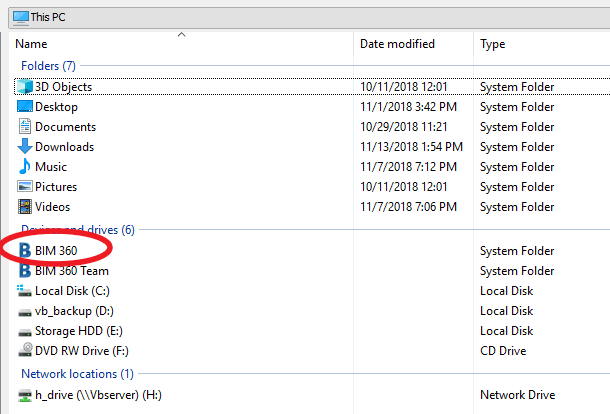
  6. Select the file (non initiated) that you want to link

You should get the BIM 360 prefix in Manage Links:

Here is a video of this process (with audio, This PC – BIM 360 workflow):

https://knowledge.autodesk.com/community/screencast/3a990f58-ed3a-4dfb-9398-e4ab08fcebe5


Here is another short video of this process here (no audio, copy-paste directory from Windows Explorer method):

https://knowledge.autodesk.com/community/screencast/02ecf93e-6359-45e4-9253-48481e4e8ea6

Open embedded content: screencast.autodesk.com

Discussion

6 archived comments. New comments are not enabled.

Scott D Davis
This method adds an extra step...because Desktop Connector builds into the Windows file system, it will be at My Computer>BIM 360 in any file dialog box, including Insert Revit or Manage Links. No need to cut and paste the path from Windows Explorer.
Luke Johnson
Good tip thanks Scott! Would be great if non-initiated models showed up after using the big BIM 360 button on the left?
Scott D Davis
Yes, I understand the wish, but they are separated for a reason: the big BIM 360 Button is reserved for Revit Cloud Workshared models, while the Desktop Connector BIM 360 link is meant for linking in files that are NOT part of Revit Cloud Worksharing, i.e. just uploaded to a BIM 360 site. Maybe we need some UI tweaks to make this more clear?
Dave Plumb
We've been using this process on one of our BIM 360 projects where the Engineers are not on BIM 360. What we've found, however, is that the every morning when you open a model, all of the Linked .RVTs uploaded thru Desktop Connector will re-create all of the worksharing "..._backup" folders. This can take quite a while every morning. I don't understand why, because although the Links ARE workshared, none of the worksharing can be accessed, since the were uploaded thru Desktop Connector. But we still have to wait for the permissions to be generated.
Luke Johnson
Thanks for the comment Dave!
Luke Johnson
Probably they just need a different icon on the file itself? But all accessible through both links?