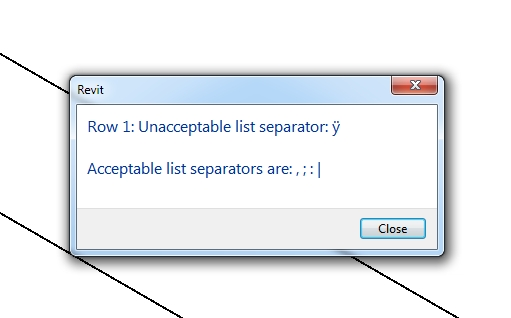
Unacceptable list separator when loading Family Types FIX
I received the ‘Unacceptable list separator’ error while trying to:
- load a family from file into a project, and
- load types into the family from a Type Catalog.
I assumed the problem was to do with Type Catalog. The family I was trying to load was from the ‘Australia’ default content –
AustraliaStructuralFramingSteelCHS-Circular Hollow Sections (AS 1163).rfa
To fix this issue I followed these steps:
- Open the Family
- Export the Types to a Type Catalog file. The exported Type Catalog should only include one type, but the syntax should be correct…
- Open the exported Type Catalog in Excel – as a comma-delimited file
- Open the ORIGINAL Type Catalog in Excel – as a comma-delimited file
- Copy the fields from the ‘Original’ default Type Catalog into your new ‘fixed’ Type Catalog (there may be more columns in the ‘fixed’ version, just Auto-Fill the other fields as necessary)
- In Excel, save the ‘fixed’ version as:
Other Formats – CSV (MS-DOS) - After closing the file, rename it so that .TXT is its extension.
- Use this fixed Type Catalog to load all of the types into the opened Family.
Discussion
4 archived comments. New comments are not enabled.
1.- First, Revit allows me to create the catalog successfully
2.- When I try to load the family, I get the following message: "Invalid column unit type: ", then "Could not parse column header: Cost"
3.- After the messages, Revits loads all "Family Types". No catalog screen to choose.
4.- The parameter "Cost" under "Identity Data" group, is not available to Modify or Remove. So, I'm stuck.
Can anyone help me?
Thanks