Schedule number of each RVT Link in project
Here’s how:
- Make sure each link has a ‘unique’ family with a ‘unique’ Mark parameter. For example, put a Sprinkler family with a Mark of 1234567 into each RVT link.
- In the ‘Site’ RVT, create a Sprinkler Schedule.
- Tick ‘Include elements in linked files’
- Add parameters –
RVT Link:File Name
Mark
Count - Filter by Mark = 1234567
- Sort By
RVT Link: File Name - Untick ‘Itemize every instance’.
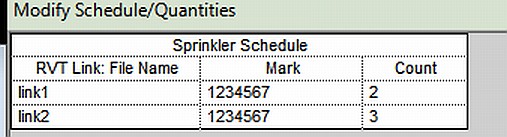
The Count field should be showing how many of each RVT Link you have in the project.
Discussion
1 archived comments. New comments are not enabled.