More Revit formula for us babies
A couple of formula tricks from the CAD Shack:
Pick One and Only One
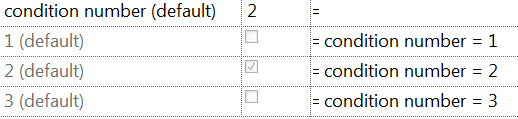
Here the condition number will allow only one paramter to be true in a list. Associated with a type, you could control a ton of things simply back picking the correct type.
“Don’t Change Me Bro”

If you need some text to not change, put that text in the Formula column with quotes around it. It greys it out in the Value column. This should stop the majority of users from changing its value.
Discussion
0 archived comments. New comments are not enabled.