How to Delete Viewport Title Types in Revit
Firstly, consolidate your Viewport Types by using Select All Instances – In Current Project and switching them to the Types you want to keep.
Then, change a Viewport to one you want to delete, and use Snoop Current Selection (RevitLookup). You can drill down to find the ElementID of the Viewport Type Definition:
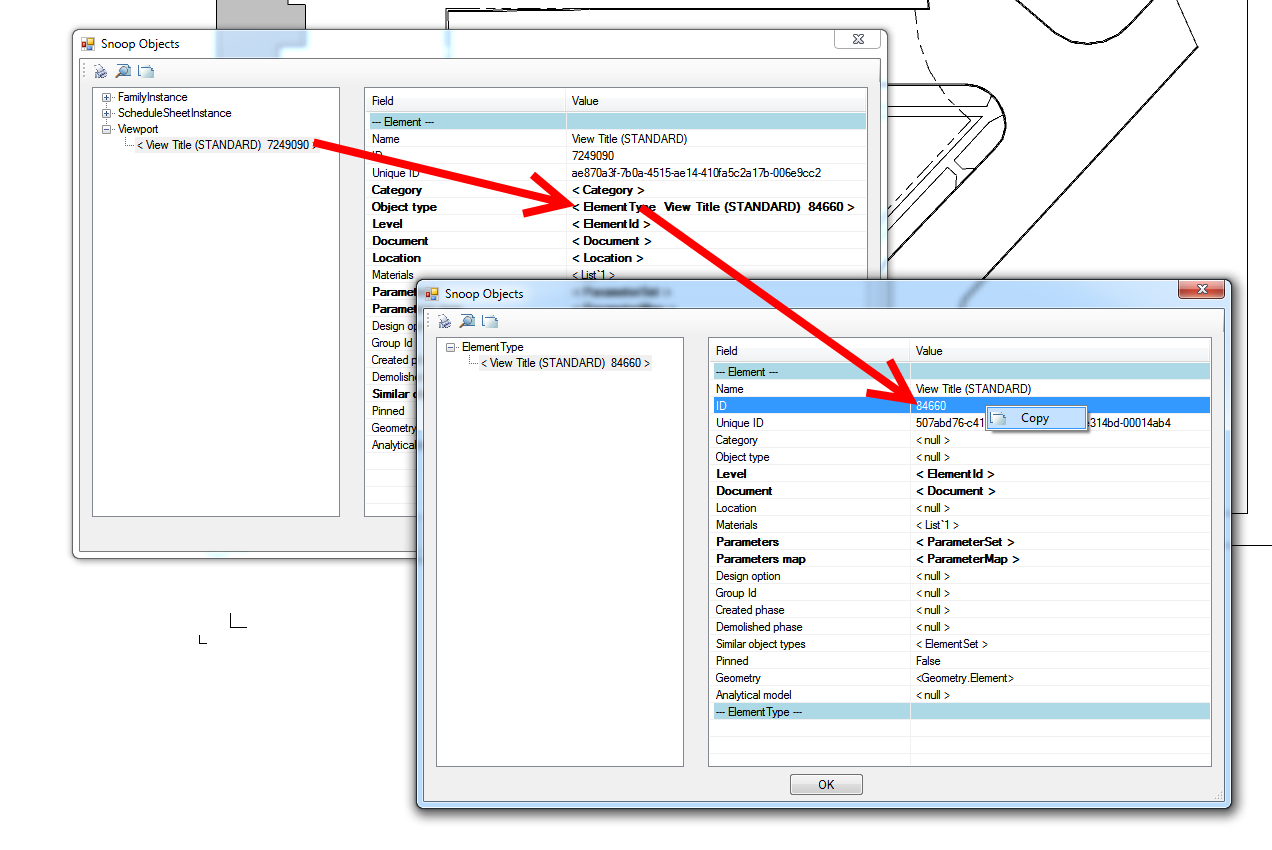
Ok, with this in hand:
- Change the Viewport back to one you want to “keep”
- Select by ID – use the ID you found above
- Press Delete on the keyboard (if any viewports still use this definition, Revit will prompt you that deleting this Viewport Type could cause problems etc).
- Rinse and repeat
Keep in mind that some Viewport Types are “special” / built-in, you will not be able to delete them all…
Discussion
8 archived comments. New comments are not enabled.
Just run the Manage function, then Help, Pick a test. this will give you some properties just as RevitLookup. search Type ID, and select by ID, delete.
cheers!