What Revit WantsA Black Grid publication
From the archive

Find all instances of a detail object and report them to a file

· Luke Johnson

Here is how to do it:

  1. Select the detail item.
  2. Right-click > Select All Instances > In Entire Project
  3. Attempt ‘Group’ command

It will fail with an error like this:
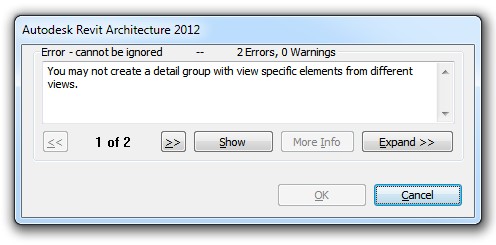
However the resulting Error Report contains the view names that all these elements exist in…

Click Expand >> and then Export…
Save the Error Report to a file and have fun going through them one by one 🙂

Discussion

7 archived comments. New comments are not enabled.

BhavesH Vaghela
this is very use full. thanks
Priit
Strange, I do not see view names in Error Report.
Could you post a picture of your error report.
Mine shows only name and id number.
Luke Johnson
When you have the ID number you can 'Select by ID', and then the Properties Palette should show the view name that the element exists in.
Stephanie
Genius - I love you Revit guys
Amir
Haha, I can't believe how a fix from 2011 can still resolve my problems with Revit 2023
Luke Johnson
Happy to help :)
Jose
So true to Amir's comment. 13 years and this seems to be the only solution. Thank you Luke!