Copy File Name and Path using Vista – Productivity Tip
Did you know that in Windows Vista you can quickly copy the file name and path of a file, and put it into the Clipboard as text? Simply:
- Select the file in Explorer
- Hold ‘Shift’ and right-click
- Choose the ‘Copy as Path’ option
You can then use this to ‘paste’ into a hyperlink, for example, in Outlook.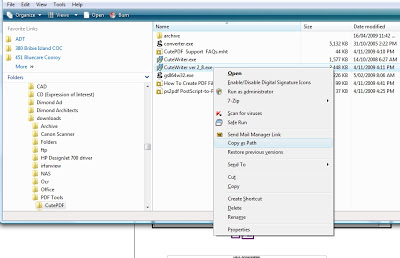 I found this at http://www.watchingthenet.com/copy-file-name-and-path-as-text-in-vista.html
Discussion
0 archived comments. New comments are not enabled.