Calculate Days Between Two Dates using Revit Formulas (using Julian Day conversion)
Mehmet Polat Diker has been busy doing some interesting Revit things over at Red Hot BIM. Like this little family that takes two dates and checks if the “deadline” has past or not. Some pretty detailed formulas here – nice work.
Download:
D_GEN_DEADLINE.rfa (Revit 2015)
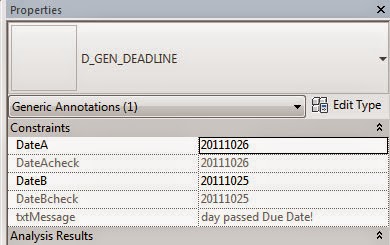
The deadline family has 2 data entry parameters:
DateA and DateB. Family expects DateA to be earlier than DateB by default.
It has 2 check parameters:
DateAcheck and DateBcheck. These parameters show how the family interprets the dates we’ve entered.
Read the whole post:
http://www.redhotbim.com/2014/05/revit-deadline-calculate-days-between.html
He has also made a Calendar family:
D_GEN_CALENDAR.rfa (Revit 2015)
from
http://www.redhotbim.com/2014/05/revit-calendar.html
Discussion
2 archived comments. New comments are not enabled.
P.S. Beers on me if you ever come to Istanbul / TURKEY!